
Permit management
Construction permit management software for high-risk work
FieldScout connects permit requests, reviews, approvals, field verification, active work windows, closeout, and audit history to the equipment, zones, inspections, and MEP workflows they affect.



Direct answer
What is construction permit management software?
Construction permit management software helps teams request, review, approve, verify, close, and audit permits for high-risk work. FieldScout makes permits browser-based and connects them to equipment records, logistics, zones, inspections, and readiness history.
Why permit workflows need field context
Paper permits are hard to review, track, and close out across multiple crews and shifts.
Permit approvals often live outside the equipment, zone, or inspection record.
Active permit windows are not always visible on the project operations calendar.
Audits require teams to reconstruct who approved what and whether field checks happened.
Workflow
Manage permit-to-work from request through closeout
FieldScout turns field coordination into a repeatable sequence with status, ownership, and audit history attached.
A worker or trade requests the permit with location, equipment, scope, and hazard details.
The reviewer checks requirements, clarifies missing information, and approves or rejects the work.
Field verification confirms conditions before the active work window begins.
The permit appears on the operations calendar and connects to the relevant zone or equipment.
Closeout captures completion, issues, and the audit history for later review.
Modules
Permit workflows FieldScout can support
Each module is built for field teams that need fast entry, clear status, and reliable records.
Hot work
Capture fire watch, area checks, approval, active window, and closeout requirements.
Confined space
Document entry requirements, approvals, verification, and completion history.
Working at heights
Route access and fall protection permit workflows through field review.
Electrical work
Connect energized work and electrical access permits to equipment records.
LOTO/isolation
Track permit requirements for isolation and energy-control workflows as configured.
Roof or access
Manage controlled access approvals and field verification for restricted areas.
Equipment use
Require approval before high-risk equipment or temporary systems are used.
Custom permits
Digitize project-specific permit forms and review steps without app downloads.
Field example
Permits connected to safety and operations
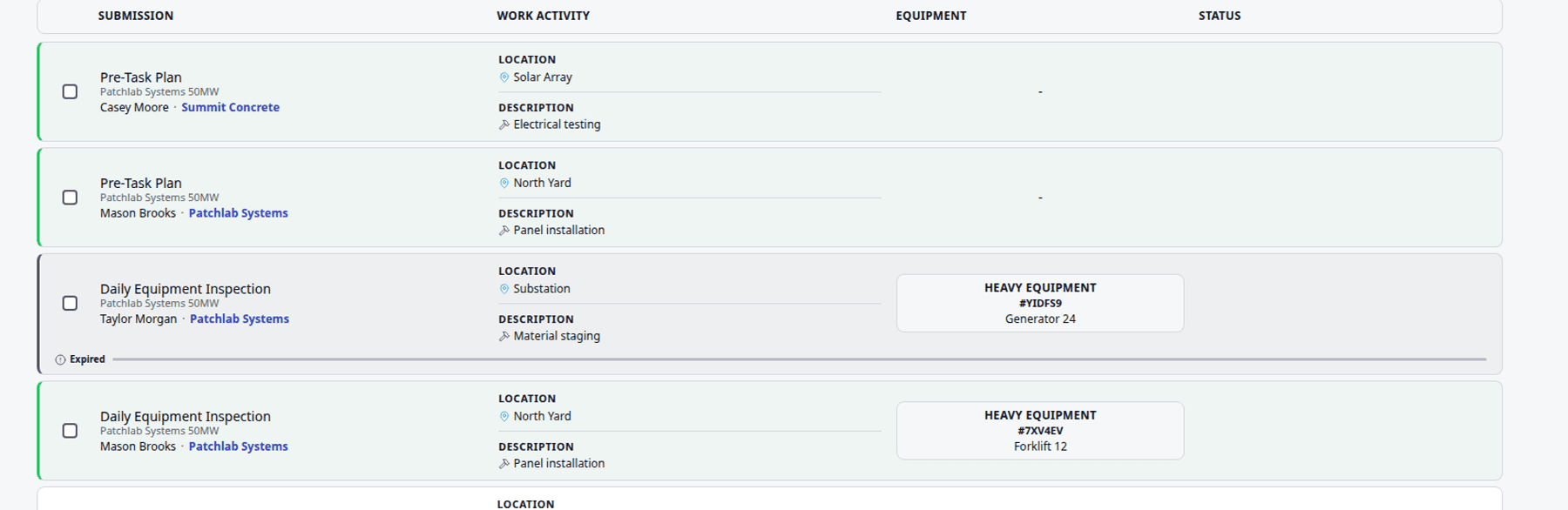
FieldScout keeps permits from becoming isolated paperwork by connecting each permit to the jobsite context around it.
Compare
FieldScout vs paper permits and spreadsheets
| Workflow | FieldScout | Paper or spreadsheets |
|---|---|---|
| Request and review | Routes permit requests through browser-based review and approval. | Paper permits depend on physical handoffs and manual status tracking. |
| Field verification | Captures verification, active windows, status, and closeout against the permit. | Verification notes can be missed or stored separately from approval. |
| Operations context | Connects permits to zones, equipment, inspections, readiness, and calendar activity. | Spreadsheets rarely show the field context needed for coordination. |
| Audit history | Keeps requester, reviewer, timestamps, changes, closeout, and related records together. | Teams rebuild the story from binders, scans, emails, and memory. |
FAQ
Common questions
What permit types can FieldScout support?
FieldScout can support hot work, confined space, working at heights, electrical or energized work, LOTO or isolation, access, roof work, equipment use, and custom project permits.
Can permits be connected to equipment?
Yes. Permits can be connected to QR equipment records, inspections, tamper seal status, issues, and readiness history.
Can permit windows show on the project calendar?
Yes. Permit windows can be visible alongside deliveries, inspections, high-risk work, and equipment readiness tasks.
Can crews submit permits without an app?
Yes. FieldScout runs in the browser, so crews can request and complete workflows from a phone without installing an app.
Related FieldScout pages
Keep exploring the connected workflows
Get a walkthrough
See permit management tied to the field
Review how FieldScout connects permit requests, approvals, active windows, field verification, equipment records, and audit history.